Release 0.2.2-beta.1 · Public beta · 794956a35501
LORA Tunnel
BETA · 0.2.2-beta.1 · Standalone Wi-Fi, BLE and LoRa observation
LORA Tunnel turns the Heltec WiFi LoRa 32 Expansion Kit V2 / V4-R8 into a handheld field terminal. Its primary Wardriver mode records nearby radio observations to microSD. A separate passive Recon mode presents matched indicators, their evidence and optional buzzer alerts. Capture runs on the device without a laptop, phone or Kismet server.
This is an early beta, not a finished GPS wardriver. A valid receiver position fix has not yet been obtained on the test unit. GNSS serial reception, sentence checksums and satellite diagnostics work, but that is not a position fix. Logs explicitly preserve missing/stale location. Automatic uploads and full Meshtastic payload decoding are also unfinished. Read the current validation record before installing.
| Home | Wardriver | Recon |
|---|---|---|
 |
 |
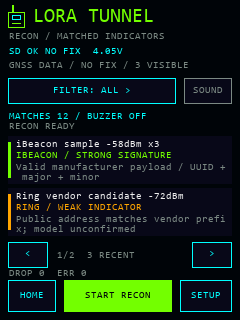 |
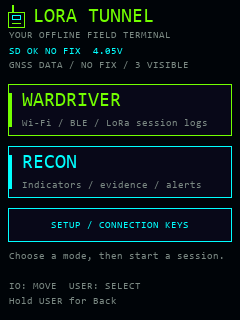
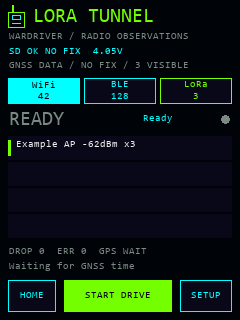
These are renders of the actual UI drawing code with synthetic sample values, not device photos or captured networks. The host font approximates the embedded font. All six views and rendering notes. The current branding is a green radio-only LORA Tunnel logo.
GitHub source · Web installer · Project page
User guide · Web installer guide · Prepare the SD card · Recovery · Hardware
What the beta does
| Area | Implemented | Current limit |
|---|---|---|
| Wi-Fi | Passive 2.4 GHz AP observations: BSSID, available SSID, channel, RSSI and security metadata | US channels 1–11; no 5/6 GHz radio; Wi-Fi and BLE share scheduled radio time |
| BLE | Passive advertisements with address type, RSSI and available names/service/manufacturer data | Random addresses are not permanent identities; scanning is time-sliced with Wi-Fi |
| LoRa | Receive-only fixed profile; raw bytes, radio metadata and candidate Meshtastic header fields | One frequency/modem configuration at a time; no complete node/message/position decoder or hopping |
| Recon | Separate passive Wi-Fi/BLE mode, evidence grades, category filters, optional SD rules and buzzer controls | Matches are indicators, not authenticated identity or proof of recording; LoRa is stopped in Recon |
| GNSS | Validity/age handling, UTC when available, checksum/fix/satellite/antenna-status diagnostics | Position fix unresolved on the test unit; ANTENNA OK is not proof of reception quality |
| Storage | Versioned JSONL sessions, bounded queues, buffered writes and visible drop/error counters | Independent SD readback, interruption recovery and sustained-drive acceptance still need completion |
| Exports | Host tools produce eligible WiGLE CSV rows and an unsigned WDGWars mesh candidate payload | WiGLE requires valid fresh receiver coordinates and UTC; current header-only LoRa logs lack the decoded node data needed for mesh export |
| Credentials | SD configuration and an on-demand touchscreen keyboard | Values are plaintext on the SD card; association, on-device export and uploads are not implemented |
Short device checks have demonstrated display/touch initialization, SD mount, Wi-Fi/BLE observations, LoRa packet reception and session transitions. The user confirmed the separate Wardriver/Recon appearance and earlier flicker fix. Those checks do not establish GPS, all detection categories, physical buttons, battery-only operation, upload support or drive-duration reliability. Exact build/test/device evidence and remaining checks are in VALIDATION.md and TEST_CHECKLIST.md.
Hardware and first start
This target is the newer Expansion Kit V2 with V4-R8, 915 MHz hardware, configured for United States operation. Its board configuration selects an ESP32-S3, 16 MB QIO flash and 8 MB OPI PSRAM, SX1262, 240 × 320 touchscreen, GNSS and microSD. V1 pin assignments and firmware are not interchangeable. Match your actual PCB and frequency variant against the verified hardware notes and official sources.
- Preserve the existing firmware and board details using the recovery guide. Confirm the target board and USB port before flashing.
- Prepare a FAT32 microSD card. Copy
sdcard/lora-tunnelto the card root, then copy itsconfig.example.jsontoconfig.jsonon the card. Leave real credentials out of the repository. - Install through the web installer guide, or build and flash below.
- Boot, check storage/GNSS status, choose Wardriver, and tap START DRIVE. Use STOP + SAVE and wait for saving to finish before removing the card or power.
- Copy
/sessions/LT-xxxxxxxx.jsonlfrom the card for export. Preserve the original JSONL files.
The supplied LoRa default is receive-only US LongFast: 906.875 MHz, 250 kHz bandwidth, SF11, CR4/5, preamble 16, sync 0x2B, with LNA bypass. A missing configuration uses these US defaults. An existing invalid configuration is recovered from a valid backup when available; otherwise LoRa is disabled and an error is shown. Other regions require a deliberately verified profile and hardware variant.
Recon works with the supplied empty detection_rules.json: built-in parsers and a compiled vendor table provide its baseline evidence. Optional SD rules add names, SSID prefixes, OUIs, services and manufacturer identifiers. The 201-row vendor CSV is an attributed reference, not an automatically loaded runtime database. See RECON.md and the SD configuration guide.
Build and flash from source
Install Python and PlatformIO Core 6.2.0, then run these commands from a checkout or unpacked source archive:
python -m pip install platformio==6.2.0
python -m platformio run -e heltec-v4-r8-tft
python -m platformio device list
The pinned pioarduino platform 55.03.312-1 uses Arduino-ESP32 3.3.12 / ESP-IDF 5.5.5. Direct library versions are pinned in platformio.ini. core_dir = .pio-core isolates framework/compiler packages from concurrent projects; keep that setting. .pio-core and .pio are generated locally and excluded from source releases. The first build needs internet to obtain dependencies; offline capture does not.
After the board and backup checks, replace PORT with the confirmed serial port, such as COM3 on Windows or /dev/ttyACM0 on Linux. Port numbers are machine-specific.
python -m platformio run -e heltec-v4-r8-tft -t upload --upload-port PORT
python -m platformio device monitor --port PORT --baud 115200
The default esptool 5.4.0 loader failed on the test unit. If normal upload stops at flash-size configuration, use the explicit legacy-stub 5.4.0 installation fallback, with a pinned tool and independent verification. Repeating the same default upload has not resolved that failure.
PlatformIO supplies the matching bootloader, partition and application addresses. Do not write the application-only firmware.bin at address 0. A web installer uses its matching release manifest and merged image. Firmware does not wait for a serial console to boot. Stock recovery and image details.
Logs, exports and diagnostics
The primary record is the versioned native JSONL session. Summaries on screen are bounded; repeated sightings remain separate observations. Receiver coordinates are kept separate from self-reported mesh/Remote ID positions. Unknown/encrypted LoRa payloads remain identifiable without invented names or coordinates. See LOG_FORMAT.md.
python tools/export_logs.py wigle path/to/session.jsonl path/to/new-export.csv
python tools/export_logs.py wdgwars-mesh-candidate path/to/session.jsonl path/to/new-candidate.json
These commands write new files and report skipped records; they do not upload. The WiGLE exporter skips missing/stale fixes, Recon/raw-frame records and, by default, randomized BLE addresses. With the unresolved GPS issue, captures may contain no eligible WiGLE rows. The WDGWars exporter requires genuinely decoded mesh identities, advertised node positions, role and forwarding information that the current LoRa decoder does not yet provide. Synthetic examples illustrate schemas, not successful service submissions. Export requirements and source checks.
Optional USB diagnostics require Python pyserial (python -m pip install pyserial if needed) and an explicit port:
python tools/bench_serial.py --port PORT --command status --seconds 10
python tools/bench_gps.py --port PORT --seconds 15
The helpers print allowlisted diagnostic fields without coordinates, observed names or credentials. bench_serial.py --command stop succeeds only after fresh status reports running=0 saving=0; neither helper validates SD file contents or proves a GPS fix. USB is optional during capture. See the user guide and GNSS diagnostics.
Development and credits
python -m pip install -r tools/site-requirements.txt
python -m unittest discover -s tests -p "test_*.py" -v
python -m platformio test -e native
Native tests require an available host C++ compiler. Build/host tests and physical acceptance are recorded separately. Next priorities are resolving and validating GNSS, sustained offline capture/recovery, richer Meshtastic decoding, verified exports, then optional uploads and additional LoRa profiles. MeshCore remains a later extension. Architecture.
Original LORA Tunnel application code is MIT licensed by Valleytech Solutions; see LICENSE. Source/relinking materials are described in RELINKING.md. Imported components retain their original licenses and notices. The Recon subset comes from Dragon Detector and retains Just Call Me Koko / ESP32Marauder and Flock Noir attribution. OpenDroneID core C is included under Apache-2.0. LoRaPipe, Kismet, Meshtastic and SquachWatch are separately identified as architecture/protocol/coverage research where implementation was not copied. Web installation uses ESP Web Tools. See THIRD_PARTY.md for exact revisions, modifications and notices; this project is independent of those upstream projects and Heltec.