Release 0.2.2-beta.1 · Public beta · 794956a35501
LORA Tunnel beta user guide
This guide covers the 0.2.2-beta.1 interface and offline workflow for the Heltec Expansion Kit V2 / V4-R8, 915 MHz US target. GPS position fixing is still unresolved on the test unit. Valid serial sentences, visible satellites or ANTENNA OK do not mean a valid location. Current evidence is recorded in VALIDATION.md.
Prepare the device
Use the official Heltec kit information and hardware notes to confirm the board and antenna/frequency variant. Preserve stock firmware using RECOVERY.md, then follow the web installer guide or source build instructions.
Prepare a FAT32 microSD card:
- Copy the repository's
sdcard/lora-tunneldirectory to the card root. - On the card, copy
lora-tunnel/config.example.jsontolora-tunnel/config.json. - Keep
detection_rules.jsonwith an emptyrulesarray for the built-in Recon detections. Add custom rules only when needed. - Insert the card and reboot. Configuration and custom detection changes are loaded at boot.
The device writes session files under /sessions. Storage is required to start capture. If the card was absent at boot, insert it and choose Setup → Retry SD; reboot to load its configuration. A full/failed card produces visible errors or drops. Stop and wait for saving to finish before removing it.
The example enables receive-only US LongFast at 906.875 MHz. Missing configuration uses the same US defaults. If an existing configuration is invalid, the firmware tries config.bak; without a valid backup it disables LoRa and reports the problem. Profile names must fit 39 UTF-8 bytes. Complete SD settings and rules.
Home and capture modes
Home offers Wardriver, Recon and Setup. Selecting a mode opens its view; it does not start capture. Changing to the other mode stops the old session and finishes queued writes. Start the new mode explicitly after saving finishes.
Returning Home, opening Setup or using Back alone leaves a running capture active. Home shows which mode is running. Reopen that mode to stop it.
| Control | Action |
|---|---|
| START DRIVE / START RECON | Begin a new recording after readiness/storage checks |
| STOP + SAVE | Stop capture and finish queued SD writes |
| HOME | Return to mode selection while preserving an active session |
| SETUP | Open credential entry and SD retry |
| WiFi / BLE / LoRa tabs | Change Wardriver's recent-observation view |
Wardriver
Wardriver records 2.4 GHz Wi-Fi AP observations, BLE advertisements and fixed-profile LoRa reception. Wi-Fi and BLE alternate on the ESP32-S3's shared radio. The SX1262 receives one frequency/modem profile at a time; it cannot hear every LoRa preset simultaneously.
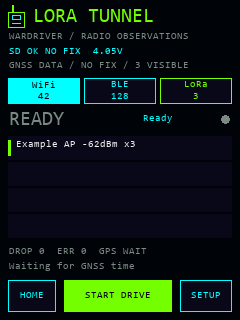
UI code render with synthetic sample values, not a device photograph.
Tab counters count admitted observations, including repeat sightings. Recent rows show summaries with available names/identifiers, RSSI and sighting counts. The bounded summary cache can evict old entries; that does not remove earlier JSONL observations. BLE random addresses do not identify a permanent device. LoRa candidate headers and packet fingerprints are not authenticated identities or decoded message content.
GPS status distinguishes valid, missing and stale data. Capture can retain observations without a fix, but the WiGLE exporter will not fabricate receiver coordinates or UTC. Error/drop counters should remain visible during a drive; increasing counts need investigation before trusting completeness.
Recon
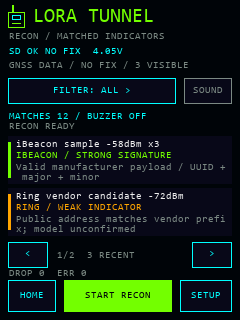
Recon uses passive Wi-Fi/BLE observations and stops LoRa. Only enabled-category matches are logged as Recon observations; ordinary unclassified traffic does not populate the Recon result list. Categories cover ALPR/Flock, bodycams, iBeacon, Ring/camera indicators, Remote ID drones, Find My/trackers, glasses, acoustic/serial indicators, radio tools and custom rules. Category labels do not guarantee that every product in a category is detectable.
| Matches | Evidence detail |
|---|---|
 |
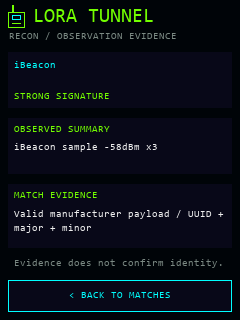 |
Both views are code renders with synthetic sample values. They do not demonstrate detection of those devices.
FILTER cycles categories. The list retains up to eight eligible recent summaries and shows two per page; arrows page through that window. Filters do not search the entire session file. Tap a result for a stable evidence snapshot.
Evidence grades are weak indicator, medium evidence and strong signature. They describe matched broadcast evidence, not probabilities, authenticated identities or recording activity. A vendor prefix may cover several product families. An Apple manufacturer identifier alone does not establish an AirTag. Remote ID positions are self-reported, separate from receiver GPS, and do not prove the operator's current location. Detection rules, provenance and limits.
MUTE / SOUND changes the current buzzer setting in RAM. Reboot restores the SD setting. The defaults display low-or-higher evidence and alert on medium-or-higher evidence. Alerts also require a winning rule that permits alerts; cooldowns limit repetition. Enabled-category matches can be logged below the display threshold. An omitted recon.categories enables all categories; an empty array enables none.
Touchscreen, buttons and keyboard
The touch interface is primary. Optional physical navigation defaults to enabled:
- IO: move focus to the next control.
- USER short press: select the focused control.
- USER held about 700 ms: go Back once.
- Touch hides the hardware focus outline. Keyboard Back cancels and clears the temporary entry.
Physical-button electrical/function acceptance remains pending. Set ui.buttons_enabled to false on the card if using touch only.
Setup offers WiGLE API name/token, WDGWars token and Wi-Fi SSID/password fields. Tapping one opens the keyboard only when needed. Stop capture before saving. Entries are bounded to 127 bytes; Save writes a checked temporary configuration and retains a previous valid backup. Existing secret values are not displayed as a prefilled entry.
This beta stores credentials but does not connect or upload. Credentials are plaintext on the removable SD card; keep real config.json, backups and session logs out of public source archives. Leave credential fields empty if not needed.
Export a session
After STOP + SAVE completes, copy the original JSONL file to your computer. Run from the source directory, choosing a new output filename:
python tools/export_logs.py wigle path/to/session.jsonl path/to/new-wigle.csv
python tools/export_logs.py wdgwars-mesh-candidate path/to/session.jsonl path/to/new-mesh-candidate.json
The exporter leaves the original log intact and reports skipped records. WiGLE requires a valid fresh receiver fix and UTC; it excludes Recon/raw Wi-Fi frame records and randomized BLE addresses by default. No usable GPS fix can mean zero exported rows.
The mesh output is an unsigned candidate, not a successful WDGWars upload. It requires decoded mesh identifiers, advertised node positions, role and known forwarding information. Current LoRa capture does not decode all those fields, so it does not yet produce eligible real mesh records. Receiver coordinates cannot substitute for a relayed node's position. Export rules and service documentation.
Optional USB diagnostics
Standalone capture does not require USB or a console. For bench work, use a confirmed port at 115200 baud and close other serial applications first. Console queries tunnel status and tunnel gps return bounded status without receiver coordinates or observed names. tunnel start and tunnel stop use the same session controls as the screen; tunnel drive and tunnel recon select a mode without starting it.
The host helpers require Python and pyserial:
python -m pip install pyserial
python tools/bench_serial.py --port PORT --command status --seconds 10
python tools/bench_serial.py --port PORT --command stop --seconds 15
python tools/bench_gps.py --port PORT --seconds 15
Replace PORT with the actual Windows COM port or Unix serial device. Both tools require it explicitly and accept bounded runs of 1–60 seconds. The GPS helper only queries diagnostics. Start/Stop require a fresh acknowledgment; Stop waits for running=0 saving=0. A successful helper run does not prove a position fix, SD file integrity or RF coverage. Satellite groups must not be summed as a unique-satellite count. GNSS diagnostic interpretation.
For a useful bug report, include firmware version, exact board revision, mode, steps, sanitized error/drop counters and whether storage/GPS reported ready. Avoid attaching credentials, raw session logs or coordinates unless you deliberately intend to share them. Hardware acceptance checklist.