YOUR REGION, YOUR RECEIVE PROFILE18 LongFast profilesFIRST RUN: LORA OFF UNTIL SELECTED
01 / TWO WAYS IN
Drive first. Inspect when you want.
01
PRIMARY MODE
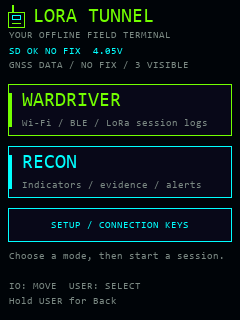
Wardriver
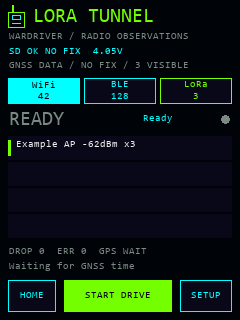
Separate Wi-Fi, BLE and LoRa views. Time-stamped observations, available receiver GPS, raw radio evidence and versioned sessions on microSD.
2.4 GHz Wi-Fi AP observations
Passive BLE advertisements
Choose a regional LoRa receive profile
Start, Stop + Save, and offline export
02
EVIDENCE VIEW
Recon
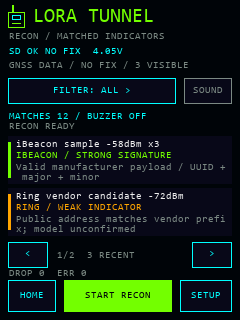
Passive Wi-Fi/BLE matches, category filters and readable evidence grades. Bounded buzzer alerts and optional SD rules help you choose what matters.
Matched results, with evidence and confidence
iBeacon, Remote ID and supported signatures
Vendor/name matches stay candidates
LoRa reception stops in Recon
A signature is evidence, not proof of a product, recording activity or identity. Randomized BLE addresses are temporary. Recon captures no Bluetooth connections and transmits no LoRa packets.
02 / YOUR POCKET CONSOLE
A bright interface. Clear observations.
Touch controls, first-run region selection, distinct modes and evidence details. Settings provides credentials, an on-demand keyboard and shutdown with confirmation.
Pick a modeHome keeps the choices simple.
Watch the driveRadio totals and session status.
Inspect the evidenceMatched results and filters.
Simulated interface previews rendered from source with synthetic examples; host rasterization can differ from the device. These images are not physical capture evidence. See every control ↗
03 / CONNECT & INSTALL
One supported kit. One clear target.
Heltec WiFi LoRa 32 Expansion Kit V2, with the V4-R8 ESP32-S3 board and 863–928 MHz radio hardware.
Use desktop Chrome or Edge over HTTPS and a USB data cable. Close serial monitors and other flashers. The installer identifies the ESP32-S3 chip; it cannot identify the expansion board or antenna variant for you.
Fresh installations start with LoRa off. Select a region on the device or skip LoRa for Wi-Fi/BLE capture. V1, 433 MHz, 470–510 MHz and other Heltec models are not supported by this build.
Installation replaces firmware. Leave Erase device unchecked when relying on a scoped recovery backup. A full-chip erase needs a verified complete 16 MB backup; the current test unit's scoped backup does not cover that operation. Back up SD logs and credentials separately.
Checking release metadata…
This browser does not expose Web Serial. Open the direct installer in desktop Chrome or Edge, or use the manual guide.
USB access is unavailable in this context. Open the direct installer over HTTPS.
Copy the supplied lora-tunnel folder to a FAT32 card. Rename config.example.json to config.json. The sample contains no credentials.
2
Region, then Wardriver
Select a region or Skip LoRa for Wi-Fi/BLE only. Start Drive begins a local session; missing GPS remains explicit.
3
Save before shutdown
Stop + Save closes the session. Settings → Power saves before sleep; USER wakes the device. Keep the native logs for export.
WiGLE CSV export needs fresh valid GPS and UTC; observations without them remain in native logs. WDGWars mesh export additionally requires decoded, trustworthy node fields that this beta does not yet produce. Export rules ↗
LORA Tunnel is by Valleytech Custom Solutions / Your Pal Kal. Original project code is MIT licensed; third-party components retain their own licenses. Dragon Detector provides the imported Recon parser subset and its inherited ESP32Marauder/Flock Noir credits. OpenDroneID supplies the Apache-2.0 decoder. LoRaPipe, Kismet and Meshtastic informed protocol research; their application code is not bundled as a complete port.
The browser installer uses ESPHome’s ESP Web Tools 10.4.0, self-hosted with its Apache-2.0 notice. Heltec is the hardware manufacturer; this is independent firmware.
 LORA TUNNEL